Minisopuru Displaylink Triple Display Docking Station for MacBook M1/M2/M3/M4/Windows,DisplayLink Docking Station with 2 HDMI & 2 DisplayPort,100W Charge, USB-C Data, Ethernet, Audio, 4 USBA Ports
By minisopuru
Last checked 4mo ago
(7 reviews)
0
$115.89$149.8923% off
ASIN:
B0BJ28RQ2N
Product ID:
70340
Price History
Current Price
$
Highest Price
$-Infinity
Lowest Price
$Infinity
Product Recommendation
Here’s your friendly recommendation in conversational English, formatted to perfection:
Hey there! 😊 Ever wish your laptop could handle three monitors AND charge fast? The Minisopuru DisplayLink Dock just dropped to $115.89—that’s 23% off—and it’s a steal for Mac/Windows users!
Why you’ll love it:
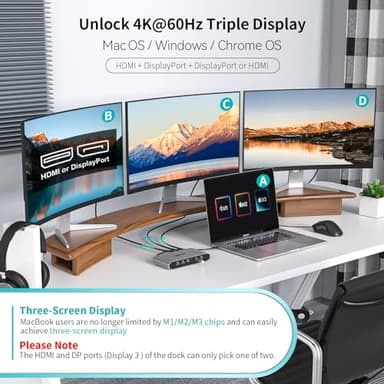
- ▶Triple 4K screens, no limits! Connect 2 HDMI + 2 DisplayPort to run three displays (HDMI+DP+DP/HDMI) at 4K@60Hz—perfect for multitasking or streaming.
- ▶Packed with ports, from 100W charging for your laptop to Gigabit Ethernet, audio, and four USB-A slots (two fast-charging 2.0 ports and high-speed USB 3.2 Gen1).
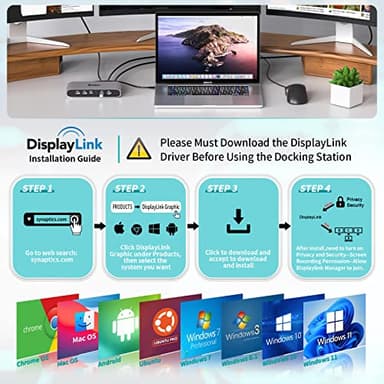
- ▶Works with MacBooks M1-M4 (just install the free DisplayLink driver) and Windows/Chrome/Android.
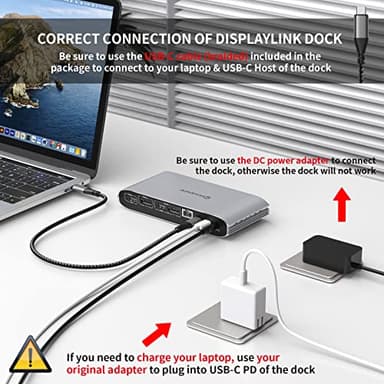
Pro tip: Plug in the 36W adapter first—it’s essential! And note: Linux isn’t supported, and if using a USB-A laptop, HDMI/charging won’t work.
At this fire sale price, this dock’s a lifesaver for productivity warriors. Don’t miss it!
Key Features
- ▶【Solve Limitation of MacBook M1/M2/M3/M4】:Minisopuru laptop docking stations by installing the DisplayLink driver, making your MacBook not limited by the M1/M2/M3/M4 chip and extending three displays with different content. The DisplayLink docking station is compatible with Windows, Chrome OS, Ubuntu, and Android.★Note: Linux/Unix is not supported.★Note: Must install the DisplayLink driver on your device to ensure proper media display functionality.
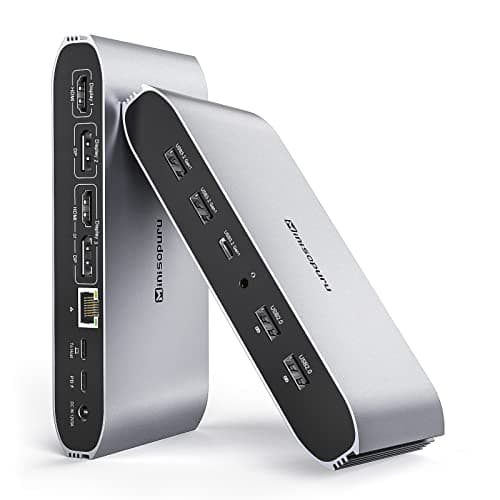
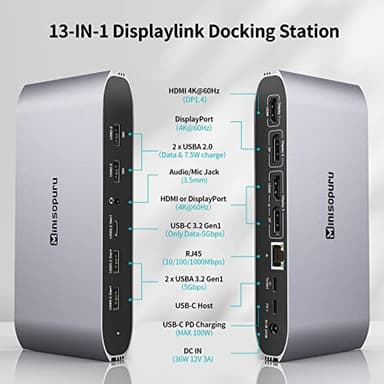
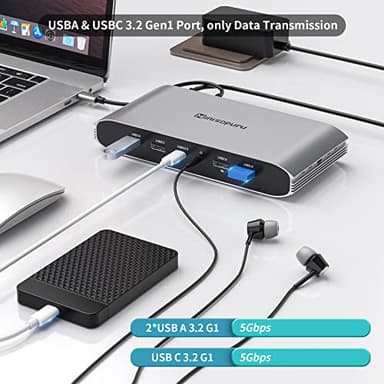
- ▶【What Ports Can be Extended】:The Minisopuru displaylink dock with 36W power adapter expand 12 ports for daily use:24K HDMI+ 24K displayport+2* 5Gbps USBA 3.2 Gen1 port(only data)+ 5Gbps USB C 3.2 Gen1 port(only data)+ 100W USB-C PD(Max)+ 2*USBA 2.0 ports(data & charge)+ Gigabit Ethernet+ 3.5 mm audio/Mic jack.★Note: The Minisopuru docking station must connect the 36W DC power adapter, otherwise it will not work.
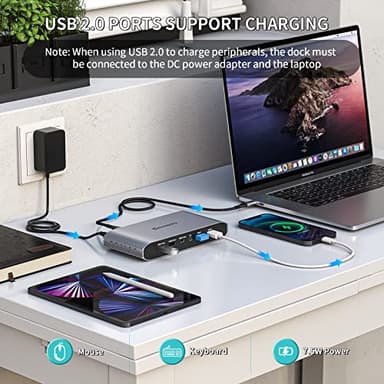
- ▶【Super Speed Data Transfer & Fast Charging】: The two USB A 2.0 ports of the laptop docking station not only can connect the keyboard and mouse, but also provides 7.5W power to charge your phone or other devices.And the USB docking station has two 5Gbps USB-A 3.2 Gen1 ports and a 5Gbps USB-C 3.2 Gen1 port(USBA/C 3.2 Gen1 only supports data transfer), transferring 1GB of files in seconds. In addition, you can choose the USB-C PD port (Max 100W) of the laptop dock to charge your laptop.
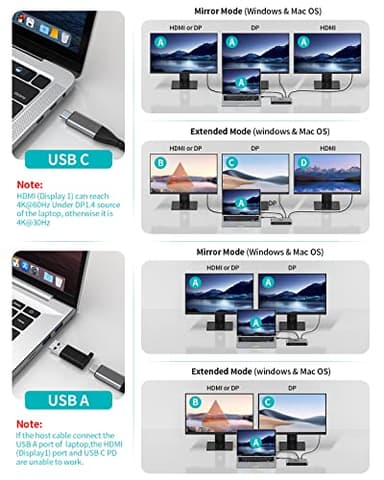
- ▶【Laptop with USB C Port: 4K Triple Display Docking Station】:The 3 monitor docking station one-stop solution to the needs of 2 types of the laptop.When MacBook Pro docking station host port connects the laptop's thunderbolt 5/4/3,USB4 or USB-C full-featured port can realize three different displays: HDMI(Display 1)+DP(Display 2)+DP or HDMI(Display 3)will reach 4K@60HZ(Under DP1.4). ★ Note: HDMI and DP ports in the display 3 areas of the Minisopuru USB C dock can only pick one of two.
- ▶【Laptop with USB A Port: 4K Docking Station Dual Monitor】: When the USB C docking station the host port connects to the USB A laptop, can realize dual different displays: DP(Display2), DP, or HDMI(Display3) will reach 4K@60HZ.★Please note: When the USB-C host port of the dual monitor docking station is connected to the USB A port of the laptop, HDMI (Display 1)and the USB-C PD are unable to work.
![[Official Google TV]Smart Projector 4K Supported with WiFi & Bluetooth, Netflix-Licensed, Outdoor Movie Projector with DoIby Audio, Auto Focus, Home Theater Proyector WIMIUS G1 (Gray, Standard)](/_next/image?url=https%3A%2F%2Fm.media-amazon.com%2Fimages%2FI%2F51DC3fX1yQL._SL500_.jpg&w=640&q=75)